Connection Queries
-
Why is the signal poor?
Distance from the router or position in your room may impact the Wi-Fi strength. You can report this to one of our advisors using the contact details below, who will escalate the information to our network team. -
I can't access my Ultimate WiFi plan on a second device at Premier Inn.
Ensure you are using the same email address that was used for the initial activation of the plan. Check your activation email for confirmation of the correct email address. -
How do I return to the login page when trying to connect to a second device?
From the payment page, there is a "Return to login" option that can be used to reconnect with the appropriate email address.
Step 1:
Step 2:
-
Why can’t I connect to the internet?
If you have selected the network, have signal, and can’t get online, contact our support team using the details below. Include your:
Wi-Fi name
Device MAC address
Date/time of login
Screenshot of the error
Venue details
Room number -
I haven’t received or cannot find my voucher code after pre booking WiFi.
Check your booking confirmation email and invoice. If you're still having trouble, kindly contact the hotel reception desk. -
How do I upgrade from Free to Ultimate?
If you have used free Wi-Fi before, you may automatically connect to the free Wi-Fi. Go to your Settings Wi-Fi, select to forget the free network, then select ‘Premier Inn Ultimate Wi-Fi’ and input your details.
Account Queries
-
How do I login using my email?
On the splash page, select "Login here" and enter your email address along with your password. If you've forgotten your password, simply click the "Forgotten Password" link to reset it. -
I’ve forgotten my email address. How can I find it?
If you’ve forgotten which email address you used, try searching your email app for any messages from “Premier Inn” or “Purple WiFi.” These might help you identify the account. If you’re still unable to remember, you’ll need to register again using a new email address. -
I’ve forgotten my password.
Click on 'Reset password' link and follow each of the instructions to reset your password. -
Can I use multiple email addresses to access my Ultimate WiFi plan on different devices?
No, using different email addresses will prevent access to your plan. Always use the email associated with the plan activation for all devices.
General Information
-
Which devices are supported?
Devices with a web browser and the ability to connect to a public service are able to access the network. Devices such as games consoles and Fire Sticks are not supported. -
How much free WiFi can I get?
There's no time limit for Premier Inn Free Wifi, and it's complimentary for all guests. -
How much does it cost?
Premier Inn offers free Wi-Fi throughout your stay. For enhanced speed and connectivity, you can upgrade to Ultimate Wi-Fi from £6 per day. This provides 24-hour access starting from the moment you connect - for example, if you activate it at 13:02, it will remain active until 13:02 the following day. Up to three devices can be connected to Ultimate. -
What payment options are supported?
Options include Visa, Mastercard or American Express, Debit/Credit card, Paypal, or vouchers purchased from the hotel reception. -
How do I get a voucher code?
Vouchers are typically available from reception. Vouchers also come with Premier Plus Rooms. They can be used on a maximum of 3 devices. -
How do I get a refund?
Apply for a refund by starting a chat here or emailing us at guest-support@purple.ai Please include your:
Full name
Email address
Date
A copy of the Wi-Fi receipt
You’ll receive an email confirming your refund, including the refund date and order reference. -
How much internet access do I get?
Premier Inn offers free Wi-Fi throughout your stay. For enhanced speed and connectivity, you can upgrade to Ultimate Wi-Fi from £6 per day. This provides 24-hour access starting from the moment you connect - for example, if you activate it at 13:02, it will remain active until 13:02 the following day. If you've pre-purchased the wifi or selected a Premier Plus room, your access will begin once you enter the code and connect at the hotel. -
How many devices can I use with Ultimate WiFi?
You can connect up to three devices to Ultimate Wi-Fi. Please note that once a device is linked, it cannot be removed, edited, or changed. To connect additional devices, please use the same email address used for the original purchase or the same voucher code. -
Can I use my purchased WiFi access at other Premier Inn locations?
Yes, although our Ultimate WiFi package offers a maximum duration of 24 hours. -
Does Premier Inn support MAC address randomisation / Private Address?
Premier Inn WiFi supports MAC randomisation, so you can connect and authenticate as normal. However, for paid networks or voucher use with device limits, we recommend turning off MAC randomisation to avoid using up multiple slots. -
How do I know if Private Address (MAC address randomisation) is enabled?
On iOS 14+ or WatchOS 7+, Private Address (MAC randomisation) is switched on by default. To check your software version, go to Settings → General → About. If it says 14.0 or higher, Private Address is likely enabled. -
How do I disable Private Address on my iPhone / iPad?
To disable Private Address on Apple devices: Go to Settings → Wi-Fi, tap the info icon next to your network, then switch off Private Address and tap Rejoin. For best results, turn Wi-Fi off and back on. This will reconnect using your device’s real MAC address - so any paid services or vouchers will be applied automatically.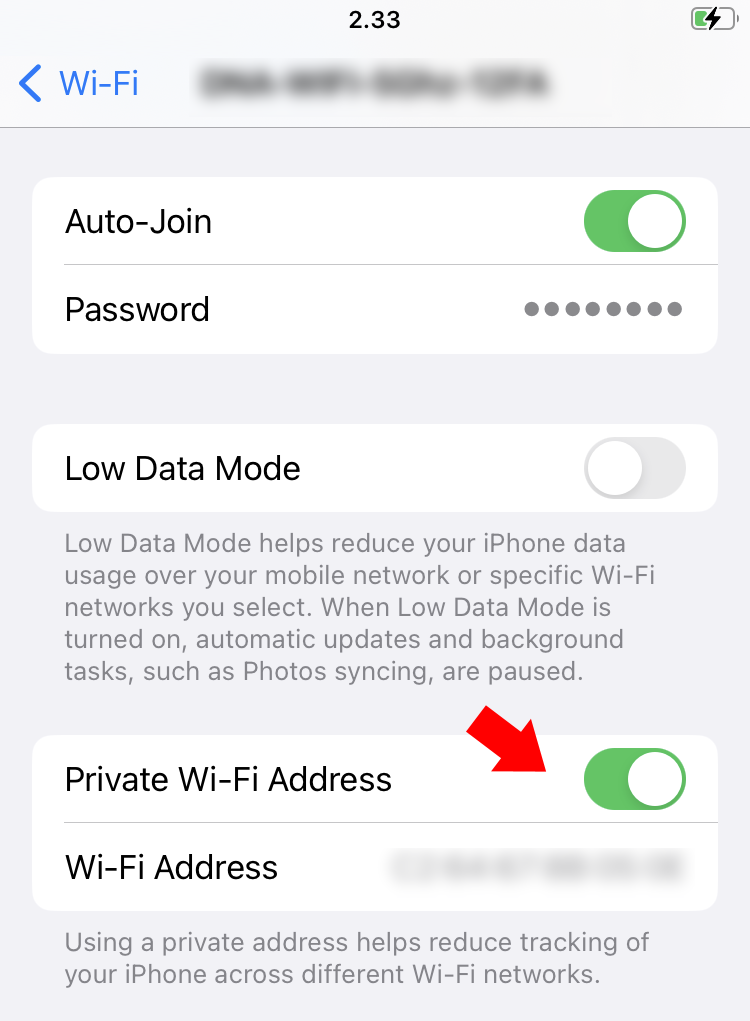

 Free Guest WiFi
 Purple App
 SecurePass
 Splash Access